

[Aug 23, 2026] Today Updated CCFR-201b Exam Dumps Actual Questions
CCFR-201b exam dumps with real CrowdStrike questions and answers
NEW QUESTION # 66
What must be true about a custom script before it can be executed from within a Fusion SOAR Workflow?
- A. The Response Policy must allow for the execution of Workflows
- B. The Share with workflows option must be enabled for the custom script
- C. The script must contain input and output JSON fields
- D. The script must exist on the host locally
Answer: B
Explanation:
For a custom script to be executed from a Fusion SOAR Workflow, it must be made available to workflows by enabling the "Share with workflows" option. This is a permissions and availability requirement: the workflow engine cannot call a custom script unless the script has explicitly been shared for workflow use. The script does not need to already exist locally on the endpoint, because Falcon can invoke scripts through RTR mechanisms depending on configuration. Input and output JSON fields may be useful for structured automation, but they are not the core prerequisite stated in the question. A Response Policy controls RTR permissions and access, but the specific workflow execution requirement is that the custom script must be shared with workflows.
NEW QUESTION # 67
Refer to the image.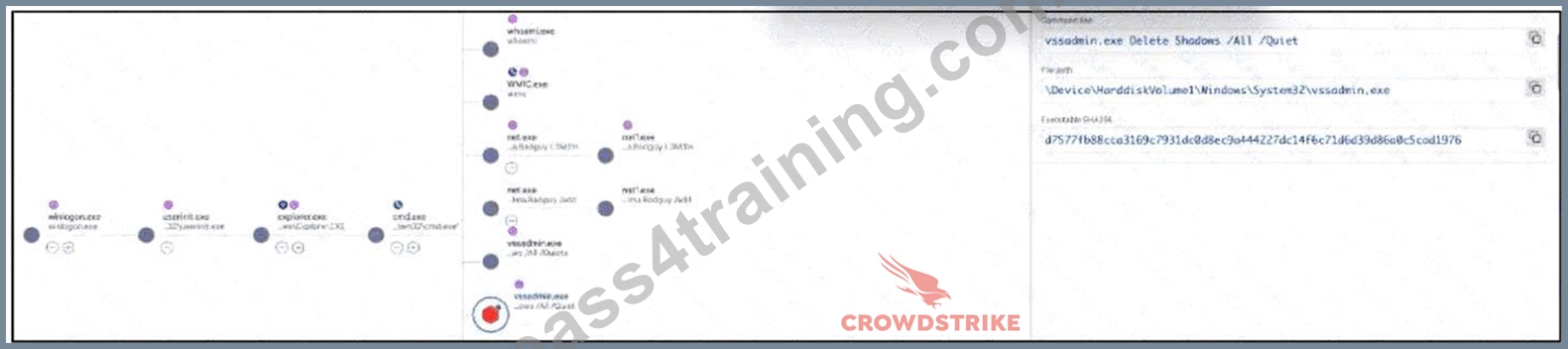
In the Full Detection View while viewing the Process Tree you see an attack outlined as in the image above.
Based on what you see, what happened during the attack?
- A. The attacker launched a command prompt, enumerated the host, created persistence, and deleted backups to prevent recovery
- B. The attacker executed malware, renamed binaries, prepared exfiltration, and deleted backups to prevent recovery
- C. The attacker launched a command prompt, renamed binaries, executed malware, and prepared exfiltration
- D. The attacker launched a command prompt to establish a reverse shell to grant remote code execution capabilities
Answer: A
Explanation:
The process tree shows activity consistent with command execution, system enumeration, persistence- related behavior, and backup deletion. The presence of command-line activity and utilities such as whoami indicates local host enumeration. The use of vssadmin.exe Delete Shadows /ALL /Quiet is a strong sign of backup deletion, commonly used by ransomware operators or destructive actors to prevent recovery. The tree also indicates additional commands associated with maintaining access or persistence rather than merely launching malware or preparing exfiltration. A reverse shell would require clear command syntax showing interactive network redirection, which is not the main activity here. The best interpretation is that the attacker launched a command prompt, enumerated the host, created persistence, and deleted backups to impair recovery.
NEW QUESTION # 68
Refer to the image.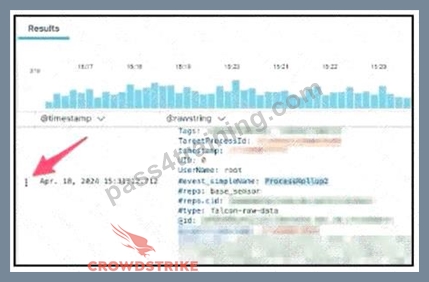
You are using Advanced Event Search to find the event record for a suspicious network connection.
Using the Event List Interactions button for the event, indicated by the arrow in the image above, which option will show all contextual event data around the process execution being investigated?
- A. Show +/- 10-minute windows of events
- B. Show Responsible Process Data
- C. Investigate Host
- D. Inspect
Answer: B
Explanation:
The correct option is Show Responsible Process Data. When investigating a suspicious network connection, the network event itself is only one part of the activity. The responder needs to identify the process responsible for initiating the connection and then pivot into the contextual process data around that execution. "Inspect" is useful for looking at the selected raw event details, but it does not provide the broader responsible-process context. "Show +/- 10-minute windows of events" expands the time window, but it is not specifically focused on the process responsible for the network activity.
"Investigate Host" pivots to host-level context, which is broader than the process-specific requirement.
Responsible process data is the most direct investigative pivot here.
NEW QUESTION # 69
Executive dashboards provide a high-level view of security. Which of the following CANNOT be seen from the Executive Summary Dashboard?
- A. The top 10 hosts with the most detections.
- B. A breakdown of Agent Versions across the fleet.
- C. The organization's current CrowdScore trend.
- D. Detections broken down by Tactic.
Answer: B
NEW QUESTION # 70
Refer to the image.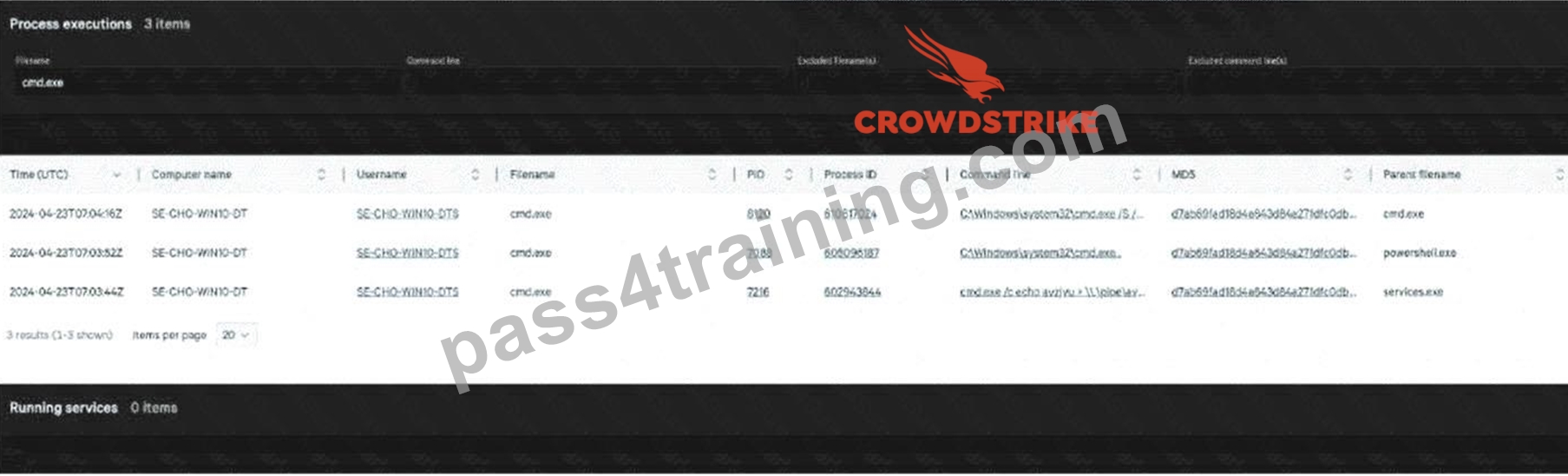
Within a Host Search, you have filtered for cmd.exe in the Process executions table and now need to pivot to a process timeline.
Which item in the table do you select to pivot to the Process Timeline?
- A. Command Line
- B. Process ID
- C. PID
Answer: B
Explanation:
The correct item to select is Process ID. In Falcon investigations, a Process Timeline requires the sensor- specific process identifier, not merely the operating system PID. The OS PID can be reused over time and is not sufficiently unique for reliable historical telemetry correlation. The Falcon Process ID maps to the process record used by the platform to retrieve process-related events such as file writes, network connections, registry activity, DNS requests, and child process creation. Selecting the command line may provide useful context, but it does not pivot directly into the process timeline. Selecting PID is less precise because it refers to the local operating system process identifier. For accurate process-scoped investigation, the Process ID is the correct pivot point.
NEW QUESTION # 71
When an analyst is trying to pinpoint the exact moment an endpoint came online after being shut down for the weekend, which timeline view is the best to use?
- A. Host Timeline
- B. User Timeline
- C. Network Timeline
- D. Process Timeline
Answer: A
NEW QUESTION # 72
A responder decides to set a specific Custom IOA to the 'Monitor' action. Which of the following sentences best describes the technical result of this choice?
- A. The sensor will automatically isolate the host from the network.
- B. The sensor will log the activity in the audit logs but will not generate a detection.
- C. The sensor will create detections with 'Informational' severity but will not block the activity.
- D. The sensor will block the activity and alert the user with a pop-up.
Answer: C
NEW QUESTION # 73
In the 'User Search - File Written' section, a responder can see various files dropped by a user. Which of the following file types CANNOT be seen from this view?
- A. Archive files (.zip, .7z)
- B. Executions (Process starts)
- C. Executables (.exe)
- D. Scripts (.ps1, .sh)
Answer: B
NEW QUESTION # 74
To perform a deep-dive investigation into a specific detection, a responder needs to pivot to a process timeline. What is the minimum information required to be gathered from the detection before making this pivot?
- A. The External IP and the Username of the logged-in user.
- B. The Agent ID (AID) and the Target Process ID (TargetProcessId_decimal).
- C. The MAC Address of the host and the SHA256 hash of the file.
- D. The Policy ID and the timestamp of the first event.
Answer: B
NEW QUESTION # 75
Refer to the image.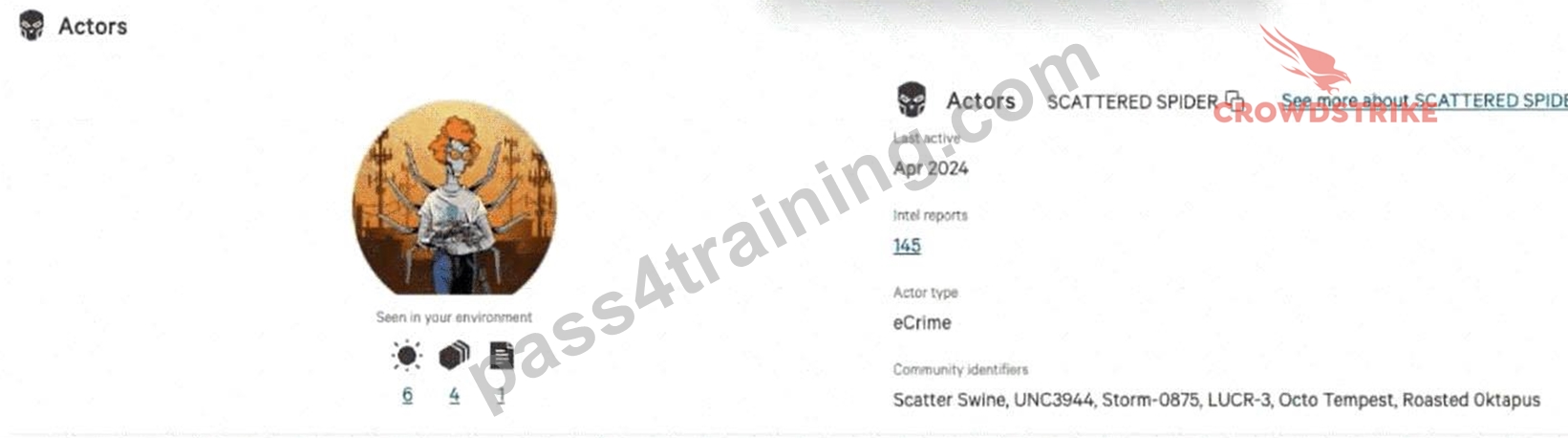
You receive the detection displayed in the image above on a host in your environment.
Assuming you have the correct permissions, where would you navigate to remotely connect to the host and investigate further?
- A. Actions > Connect to host
- B. View Incident > Connect to host
- C. Investigate > Connect to host
Answer: A
Explanation:
The correct navigation path is Actions > Connect to host. In Falcon, responders commonly initiate live response actions directly from the detection or host context using the Actions menu. This allows an authorized responder to start a Real Time Response session for hands-on investigation, artifact collection, command execution, and remediation. "Investigate > Connect to host" is not the direct path shown for this detection-driven workflow. "View Incident > Connect to host" is also incorrect because the task is to remotely connect to the affected host from the detection context, not simply open the incident view. The key requirement is permission-based RTR access; without the correct role and response policy permissions, the connection option may not be available.
NEW QUESTION # 76
A responder is using 'Host Search' to gather baseline data on a machine. Which of the following pieces of information is NOT provided by the Host Search results?
- A. List of running services and drivers.
- B. List of local user accounts and administrators.
- C. Macro Execution History for Microsoft Office products.
- D. Recent network connections and IP addresses.
Answer: C
NEW QUESTION # 77
How long are quarantined files stored on the host?
- A. 90 Days
- B. 30 Days
- C. Quarantined files are never deleted from the host
- D. 45 Days
Answer: C
NEW QUESTION # 78
Your lead analyst instructs you to dump the kernel memory of a Windows system using Real Time Response (RTR).
Which native RTR command best helps you to quickly achieve the task?
- A. xmemdump
- B. CSWINDIAG
- C. memdump
- D. dumpmem
Answer: A
Explanation:
The correct RTR command is xmemdump. In Falcon Real Time Response, memory acquisition commands must be selected carefully because different commands collect different types of diagnostic or memory data. CSWINDIAG is associated with collecting diagnostic information and troubleshooting data, not directly dumping kernel memory. memdump is generally associated with process memory collection rather than the Windows kernel-memory task described in the question. dumpmem is not the best native RTR command for this scenario. Since the lead analyst specifically asks for kernel memory from a Windows system, xmemdump is the appropriate command. This matters operationally because using the wrong RTR command can waste response time and fail to collect the artifact required for deeper forensic analysis.
NEW QUESTION # 79
In various telemetry events like 'FileWrite' or 'NetworkConnect', Falcon identifies the process that performed the action. Which field will always identify this "acting" process?
- A. ContextProcessId_decimal
- B. OwnerProcessId_decimal
- C. ParentProcessId_decimal
- D. TargetProcessId_decimal
Answer: A
NEW QUESTION # 80
Refer to Image: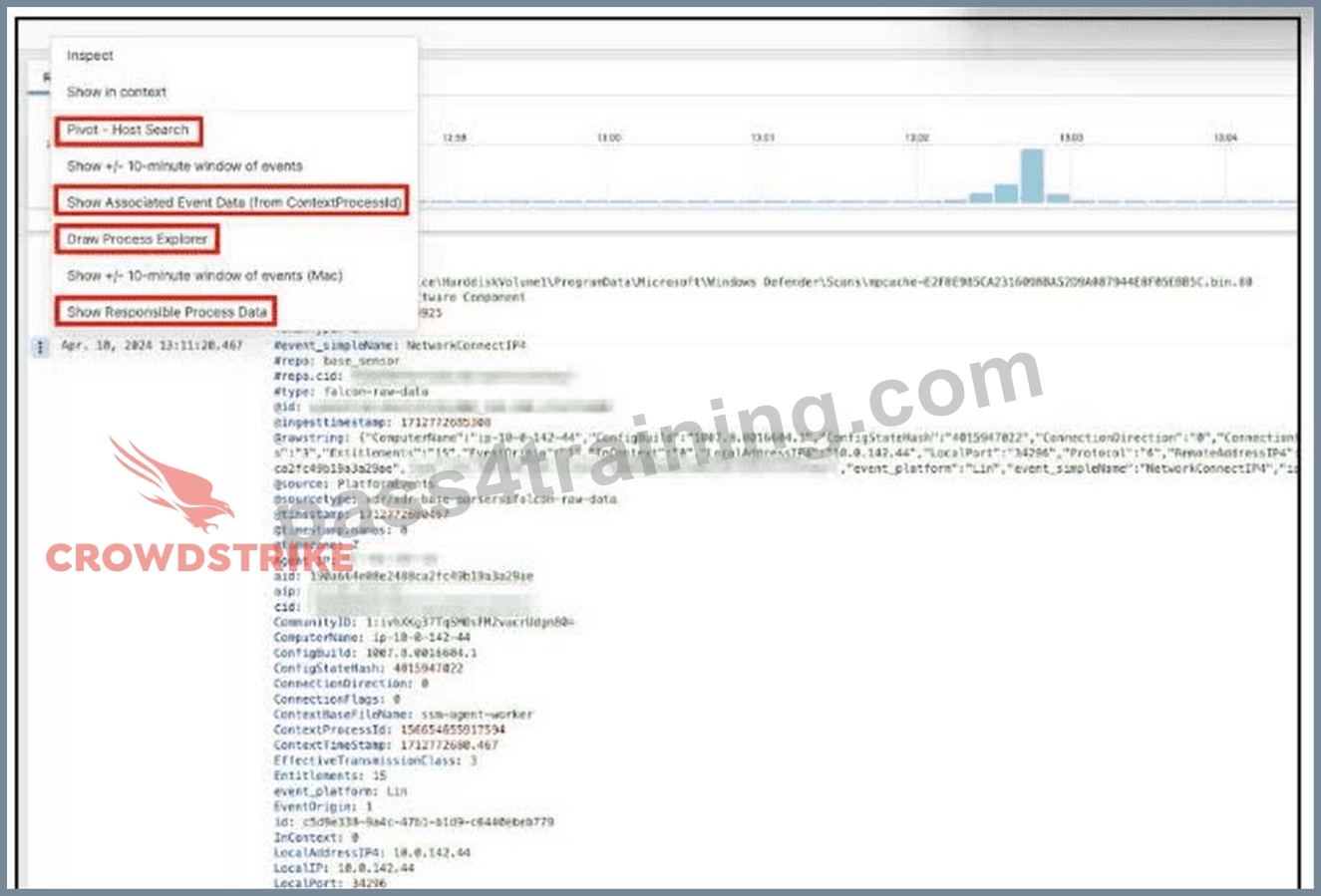
You are investigating a network connection in event search.
Which option next to the raw event data should you select to pivot to a graphical representation for all the processes related to the network connection event?
- A. Show Associated Event Data
- B. Show Responsible Process Data
- C. Draw Process Explorer
- D. Inspect
Answer: C
Explanation:
The correct option is Draw Process Explorer because the question asks for a graphical representation of the process relationships associated with the network connection event. Process Explorer is used to visualize process lineage, parent-child relationships, and related process activity in a graph-style view.
"Inspect" displays raw details about the selected event but does not create a graph. "Show Responsible Process Data" pivots to the process responsible for the event, which is useful, but it is not the graphical process representation requested. "Show Associated Event Data" expands related event context but remains data-oriented rather than graph-oriented. In Falcon event investigations, Process Explorer is valuable when the responder needs to understand how a suspicious network event fits into the broader process chain.
NEW QUESTION # 81
Refer to the image.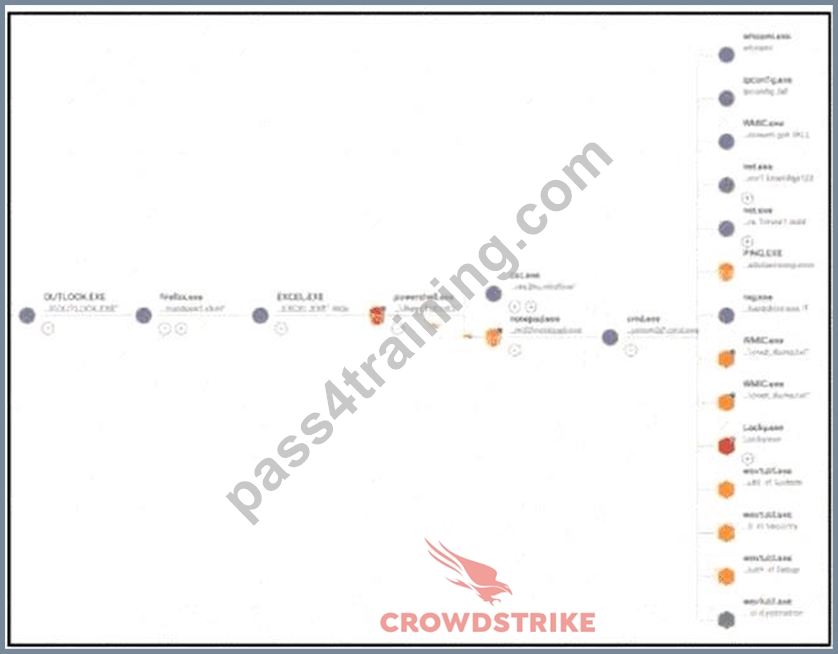
What does the arrowed line indicate?
- A. The thread injection was considered a Medium severity injection
- B. Notepad.exe injected itself into Excel.exe
- C. PowerShell spawned Notepad.exe, which injected a thread back to PowerShell
- D. PowerShell spawned Notepad.exe, which injected a thread back to Excel.exe
Answer: C
Explanation:
The arrowed relationship indicates process injection activity, not a normal parent-child process relationship. In the displayed graph, PowerShell launches Notepad.exe, and the highlighted relationship shows Notepad.exe injecting a thread back into PowerShell. This type of behavior is suspicious because adversaries often use benign-looking processes as injection targets or injectors to hide execution, evade detection, or manipulate process behavior. Option B is incorrect because the arrow does not primarily describe severity; severity is a separate detection attribute. Option D is incorrect because the visual relationship does not show Notepad injecting into itself. Option A is also incorrect because the highlighted relationship points back to PowerShell, not Excel. Correctly reading these graph relationships is essential during Falcon detection analysis.
NEW QUESTION # 82
When examining raw event data, what is the purpose of the field called ParentProcessld_decimal?
- A. It contains the TargetProcessld_decimal value of the child process
- B. It contains the Sensorld_decimal value for related events
- C. It contains an internal value not useful for an investigation
- D. It contains the TargetProcessld_decimal of the parent process
Answer: D
NEW QUESTION # 83
......
CrowdStrike CCFR-201b Exam Syllabus Topics:
| Topic | Details |
|---|---|
| Topic 1 |
|
| Topic 2 |
|
| Topic 3 |
|
| Topic 4 |
|
Exam Sure Pass CrowdStrike Certification with CCFR-201b exam questions: https://www.pass4training.com/CCFR-201b-pass-exam-training.html
CCFR-201b Exam in First Attempt Guaranteed: https://drive.google.com/open?id=1v4xkk3c2WTQiq5XxhPvxCBuEpL9bJZ5R
