

(Dec-2025) Latest FCP_FMG_AD-7.6 Dumps for Success in Actual Fortinet Certified
Changing the Concept of FCP_FMG_AD-7.6 Exam Preparation 2025
NEW QUESTION # 28
Refer to the exhibit. An administrator assigned a new policy package to FortiGate HQ-NGFW-1.
In the installation preview, they noticed some settings they did not modify and are unsure about the changes.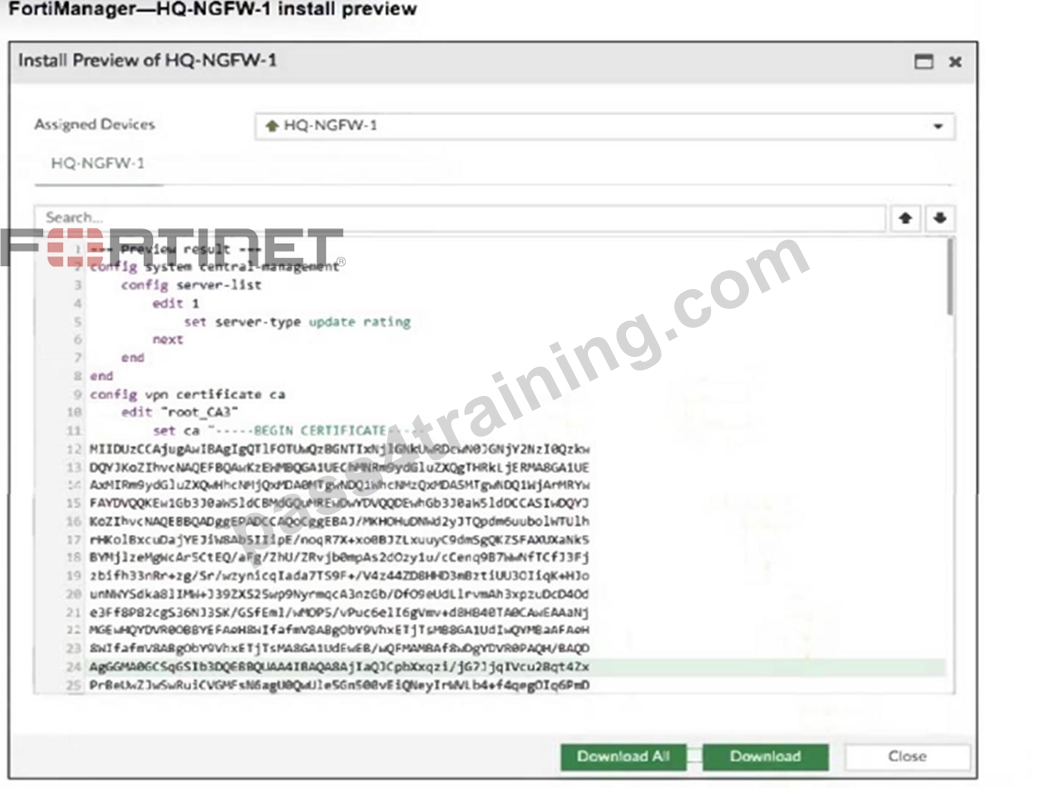
Based on the exhibit, which two things will happen if they continue with the installation? (Choose two.)
- A. FortiGate HQ-NGFW-1 will use the root_CA3 certificate in firewall address objects or policies.
- B. FortiManager will install the CA certificate named root_CA3 to authenticate FortiGate-to- FortiManager communication protocol (FGFM) tunnel connections with FortiGate HQ- NGFW-1.
- C. FortiGate HQ-NGFW-1 can contact the FortiManager acting as FortiGuard Distribution Server (FDS) to download FortiGuard updates.
- D. FortiGate HQ-NGFW-1 can use FortiManager firmware templates to upgrade firmware and ratings.
Answer: B,C
Explanation:
The configuration includes a server-list with server-type set to "update rating," which enables FortiGate HQ-NGFW-1 to contact FortiManager as a FortiGuard Distribution Server (FDS) for FortiGuard updates.
The installation includes a root_CA3 certificate, which FortiManager will install on FortiGate HQ- NGFW-1 to authenticate FGFM tunnel connections between the devices.
NEW QUESTION # 29
Company policy dictates that any time a change is made to a policy package on FortiManager an ADOM revision is created before the change installed, and that revision is held for a minimum of
90 days.
Over the past three months, each installed change has resulted in several unused policies and duplicate objects.
The FortiManager administrator plans to upgrade the FortiGate devices and then upgrade the FortiManager ADOM from version 7.4 to 7.6.
Which action can the administrator take to avoid slow ADOM upgrades?
- A. Export firewall policies to Excel, delete them on the ADOM. then reimport them after upgrading the ADOM.
- B. Find unused firmware templates, then delete them before upgrading.
- C. Limit ADOM revisions before upgrading.
- D. Check and repair the global configuration database before upgrading.
Answer: C
Explanation:
Limiting ADOM revisions reduces the number of stored historical configurations, which helps avoid performance degradation and slow ADOM upgrades caused by a large volume of revisions.
NEW QUESTION # 30
An administrator has a FortiGate-HQ device with VDOMs-root, HR and Facilities, currently managed under the FortiManager ADOM-Site1. They try to move VDOM HR to the FortiManager ADOM-Site2, but it does not work.
Why is the administrator not able to move FortiGate-HQ VDOM HR to FortiManager ADOM-Site2?
- A. FortiManager must be in ADOM normal mode, which does not allow VDOMs to be managed separately.
- B. The administrator must delete the FortiGate-HQ device from FortiManager and add it again using the Add Device wizard before moving the VDOM.
- C. The administrator must have full access in the device layer of FortiGate-HQ VDOM-root before they can VDOMs to different ADOMs.
- D. The FortiGate-HQ must be managed under the FortiManager ADOM-root to allow moving its VDOMs to different ADOMs.
Answer: D
Explanation:
FortiGate devices must be managed under the FortiManager ADOM corresponding to the root VDOM to allow their individual VDOMs to be moved and managed in different ADOMs. Managing the root VDOM in a different ADOM prevents moving subordinate VDOMs across ADOMs.
NEW QUESTION # 31
Refer to the exhibit.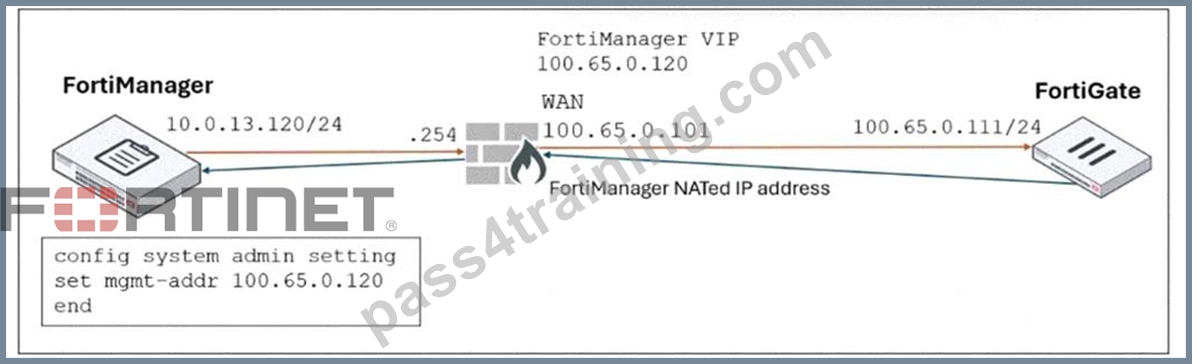
FortiManager is operating behind a network address translation (NAT) device, and the administrator configured the FortiManager NATed IP address under the FortiManager system administration settings.
What is the expected result during discovery?
- A. FortiManager sets the 100.65.0.101 IP address on FortiGate.
- B. FortiManager sets both the 100.65.0.120 IP address and 10.0.13.120 IP address on FortiGate.
- C. FortiManager sets the 100.65.0.120 IP address on FortiGate.
- D. FortiManager sets both the 100.65.0.120 IP address and 100.65.0.101 IP address on FortiGate.
Answer: C
Explanation:
When FortiManager is behind a NAT device, setting the NATed IP address (100.65.0.120) in the system admin settings causes FortiManager to use that NATed IP address for communication and configuration with FortiGate during discovery and management operations.
NEW QUESTION # 32
An administrator, Trainer, who is assigned the Super_User profile, is trying to approve a workflow session that was submitted by another administrator, Student. However, Trainer is unable to approve the workflow session.
What can prevent an admin account that has Super_User rights over the device from approving a workflow session?
- A. Trainer does not have full rights over this ADOM.
- B. Trainer must close Student's workflow session before approving the request.
- C. Trainer is not a part of workflow approval group.
- D. Trainer must first create their own workflow session to approve student session.
Answer: C
Explanation:
An administrator must be part of an approval group, and have rights over the ADOM in which the session was created.
NEW QUESTION # 33
An administrator wants to configure and manage multiple objects in the FortiManager database and give access to other users who work in the same database. To stay in control of the changes made to firewall policies by other team members, the administrator needs a setup where all modifications go through a central check before they can be installed.
How can the administrator create this setup?
- A. Enable the prompt asking the administrator to accept firewall policies changes before saving.
- B. Enable the workspace (for all ADOMs) to control all changes made by any administrator.
- C. Enable device lock and the advanced mode feature in the ADOM.
- D. Enable workflow mode and the ADOM lock feature.
Answer: D
Explanation:
Enabling workflow mode along with the ADOM lock feature ensures that all configuration changes go through a centralized review and approval process before installation, allowing controlled and coordinated management of firewall policies by multiple administrators.
NEW QUESTION # 34
Refer to the exhibit.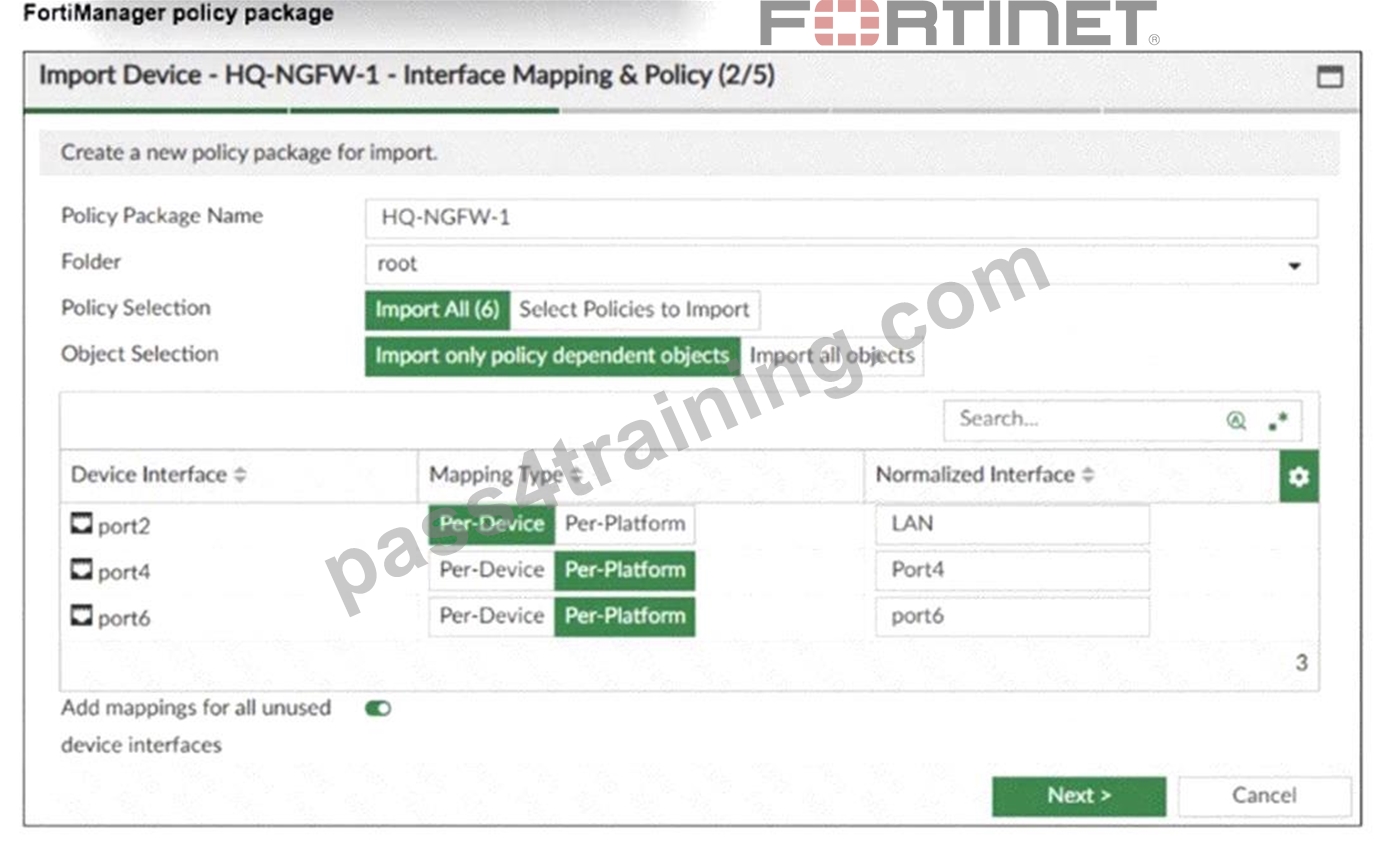
An administrator added a FortiGate device to FortiManager with the default object settings at the ADOM layer.
What can you conclude from the import policy package process of the HQ-NGFW- 1 device?
- A. FortiManager will create LAN, port4, and port6 as normalized interfaces at the ADOM layer.
- B. FortiGate may not work as expected when the administrator does not import all objects.
- C. The administrator must select Per Platform for all interfaces to correctly detect all interfaces from HQ- NGFW-1.
- D. The administrator must manually create the port4 interface on the ADOM layer to avoid import policy errors.
Answer: A
Explanation:
The import process shows that FortiManager will create normalized interfaces named LAN, port4, and port6 at the ADOM layer, mapping them to the corresponding device interfaces based on the import settings.
NEW QUESTION # 35
A service provider administrator has assigned a global policy package to a managed customer ADOM named My_ADOM. The customer administrator has access only to My_ADOM. How can the customer administrator edit the global header policy of the global policy package?
- A. The customer administrator can edit the header policy by using workspace mode on the global ADOM.
- B. The customer administrator can edit the header policy by using workflow mode on the global ADOM and My_ADOM.
- C. The customer administrator cannot edit the global header policy; only the service provider administrator can make changes from the global ADOM.
- D. The service provider administrator can unlock the global policy from the global ADOM to authorize changes to the customer administrator.
Answer: C
Explanation:
The global policy package is managed only from the global ADOM by the service provider administrator. Customer administrators with access solely to their ADOM (My_ADOM) cannot edit the global header policy; such changes must be made by the service provider administrator in the global ADOM.
NEW QUESTION # 36
You are moving managed FortiGate devices from one ADOM to a new ADOM.
Which statement correctly describes the expected result?
- A. The shared device settings will be installed automatically.
- B. Policy packages will be imported into the new ADOM automatically.
- C. The shared policy package will not be moved to the new ADOM automatically.
- D. Any unused objects from a previous ADOM are moved to the new ADOM automatically.
Answer: C
Explanation:
When you move devices from one ADOM to another ADOM, shared policy packages and objects do not move to the new ADOM. You will need to import policy packages from managed devices.
NEW QUESTION # 37
Refer to the exhibit. FortiManager is operating behind a network address translation (NAT) device, and the administrator configured the FortiManager NATed IP address under the FortiManager system administration settings.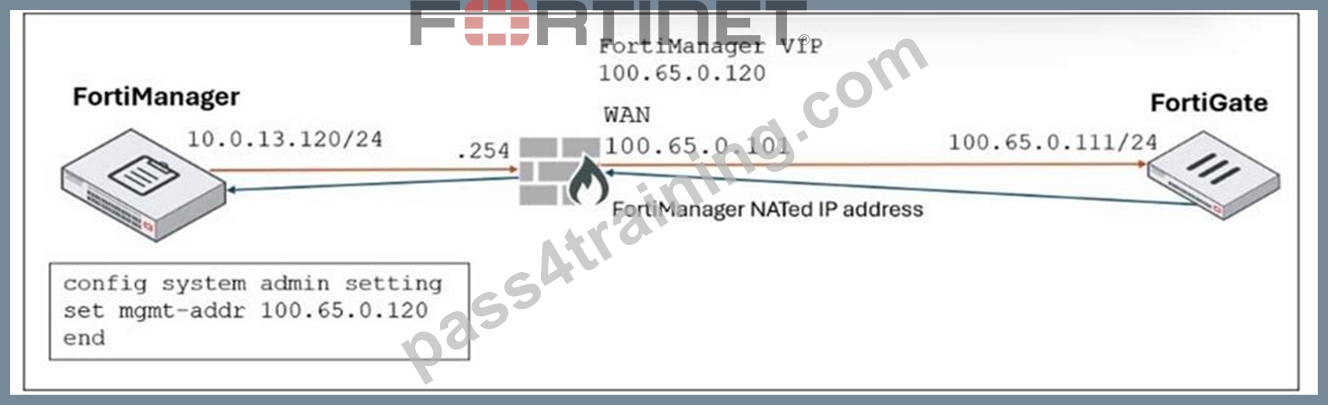
What is the expected result during discovery?
- A. FortiManager sets the 100.65.0.101 IP address on FortiGate.
- B. FortiManager sets both the 100.65.0.120 IP address and 10.0.13.120 IP address on FortiGate.
- C. FortiManager sets the 100.65.0.120 IP address on FortiGate.
- D. FortiManager sets both the 100.65.0.120 IP address and 100.65.0.101 IP address on FortiGate.
Answer: C
Explanation:
When FortiManager is behind a NAT device, setting the NATed IP address (100.65.0.120) in the system admin settings causes FortiManager to use that NATed IP address for communication and configuration with FortiGate during discovery and management operations.
NEW QUESTION # 38
An administrator is copying a system template profile between ADOMs by running the following command:
execute fmprofile export-profile ADOM 3547 /tmp/Backup_File
output dump to file: [/tmp/Backup_File]
Where does this command export the system template profile from?
- A. FortiManager configuration backup file
- B. ADOM device database
- C. FortiManager ADOM policy database
- D. FortiManager /tmp/Backup_File folder
Answer: C
Explanation:
The command exports the system template profile from the FortiManager ADOM policy database, which stores the configuration templates for devices within that ADOM.
NEW QUESTION # 39
An administrator configures a new BGP peer in the FortiManager device-level database of FortiGate. They reinstall the policy package to the managed FortiGate device without any errors. However, when the administrator logs in to FortiGate, they do not see the BGP configuration changes.
What is the most likely reason why FortiManager did not push the BGP peer changes to FortiGate?
- A. The administrator must run a sanity check on FortiManager to make sure the database is not corrupted.
- B. Fortigate has a BGP template assigned on the FortiManager database.
- C. The FortiGate firmware version is different from the FortiManager ADOM version.
- D. The administrator must use the Install Wizard and select Install device settings only to push BGP settings
Answer: B
Explanation:
If a BGP template is assigned to the FortiGate device on FortiManager, device-level BGP configurations made directly in the device-level database are overridden by the template settings, so the changes do not get pushed to the device.
NEW QUESTION # 40
What is the best explanation of how FortiManager helps with mass provisioning?
- A. It uses templates to configure the same settings on many devices simultaneously.
- B. It provides local FortiGuard Distribution Server (FDS) services to the network.
- C. It upgrades the OS of each FortiGate device.
- D. It sends email alerts when new devices connect.
Answer: A
Explanation:
FortiManager helps with mass provisioning by using templates that allow administrators to configure the same settings on multiple FortiGate devices simultaneously, streamlining deployment and management.
NEW QUESTION # 41
Refer to the exhibit.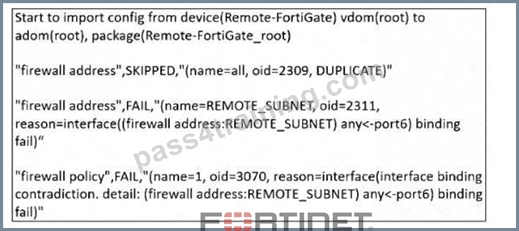
What can you conclude from the downloaded import report?
- A. As a result of this policy import process, FortiManager will create a new firewall address called REMOTE_SUBNET in the ADOM database.
- B. FortiManager will change the configuration of REMOTE_SUBNET to match the interface mapping coming in from Remote-FortiGate.
- C. The administrator will see a new policy package named Remote-FortiGate_root in the FortiManager ADOM database.
- D. FortiManager does not support per-device mapping for firewall addresses.
Answer: C
Explanation:
The import report shows that a new policy package named Remote-FortiGate_root will be created in the FortiManager ADOM database, but some firewall addresses and policies failed to import due to interface binding conflicts.
NEW QUESTION # 42
An administrator wants to configure and manage multiple objects in the FortiManager database and give access to other users who work in the same database.
To stay in control of the changes made to firewall policies by other team members, the administrator needs a setup where all modifications go through a central check before they can be installed.
How can the administrator create this setup?
- A. Enable the prompt asking the administrator to accept firewall policies changes before saving.
- B. Enable the workspace (for all ADOMs) to control all changes made by any administrator.
- C. Enable device lock and the advanced mode feature in the ADOM.
- D. Enable workflow mode and the ADOM lock feature.
Answer: D
Explanation:
Enabling workflow mode along with the ADOM lock feature ensures that all configuration changes go through a centralized review and approval process before installation, allowing controlled and coordinated management of firewall policies by multiple administrators.
NEW QUESTION # 43
What is the purpose of ADOM revisions?
- A. ADOM revisions save the current state of all policy packages and objects for an ADOM.
- B. ADOM revisions show specific changes in a policy package when it is installed.
- C. ADOM revisions compare previous snapshots of the Policy Package and ADOM-level objects with the device-level database.
- D. ADOM revisions find unused, duplicate, and unnecessary firewall policies and objects.
Answer: A
Explanation:
ADOM revisions save the current state of all policy packages and objects within an ADOM, allowing administrators to track changes over time and revert to previous configurations if needed.
NEW QUESTION # 44
Refer to the exhibit.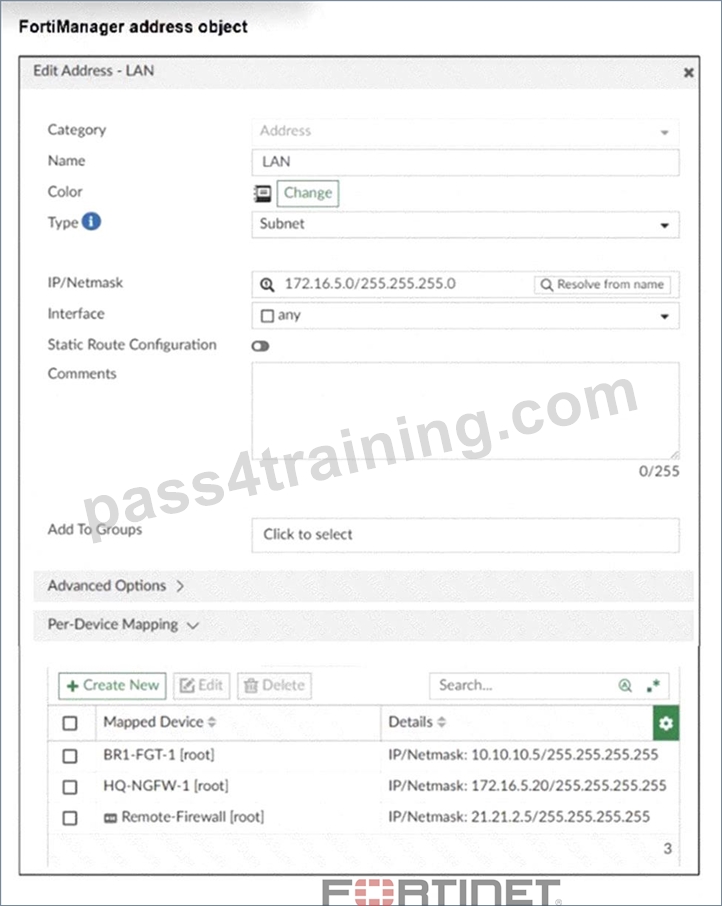
An administrator has created a firewall address object that is used in multiple policy packages for multiple FortiGate devices in an ADOM.
After the installation operation is performed, which IP/netmask will be installed on Remote-Firewall
[VDOM1] for the LAN firewall address object?
- A. 172.16.5.20/255.255.255.255
- B. 172.16.5.0/255.255.255.0
- C. 10.10.10.5/255.255.255.255
- D. 21.21.2.5/255.255.255.255
Answer: D
Explanation:
The per-device mapping overrides the global IP/netmask setting for the firewall address object. For the device
"Remote-Firewall," the mapped IP/netmask is 21.21.2.5/255.255.255.255, so this value will be installed on Remote-Firewall [VDOM1].
NEW QUESTION # 45
The administrator uses FortiManager to push a CLI script using the Remote FortiGate Directly (via CLI) option to configure an IPsec VPN. However, when running the script, the administrator receives the following error:
config vpn ipsec phase2-interface [parameter(s) invalid. detail: object mismatch] What must the administrator do to resolve the script error and successfully apply the IPsec configuration?
- A. Add a second config vpn ipsec phase2-interface block without linking it to phase1.
- B. Add the end command after finishing the IPsec phase 1-interface configuration block.
- C. Use IPsec templates to deploy provisioning templates.
- D. Run the script using the policy package or ADOM database method.
Answer: D
Explanation:
Running the script through the policy package or ADOM database method allows FortiManager to properly interpret object relationships and dependencies in the IPsec configuration, preventing object mismatch errors when pushing complex VPN settings directly via CLI.
NEW QUESTION # 46
What must you consider before deciding to use FortiManager to manage a FortiAnalyzer device?
- A. Determine whether the VDOMs of the same FortiGate will be assigned to different ADOMs.
- B. Ensure that FortiAnalyzer features are installed in advance.
- C. Check whether FortiManager is part of a high availability (HA) cluster.
- D. Confirm that FortiManager has enough storage capacity for the expected logs.
Answer: A
Explanation:
When FMG is managing a FAZ, you cannot switch to advanced mode. And it s only in advanced mode Vdoms of the same Fortigate can be assigned to differents ADOM.
NEW QUESTION # 47
An administrator has enabled Service Access on FortiManager. What is the purpose of Service Access on the FortiManager interface?
- A. It allows FortiManager to determine the connection status of managed devices.
- B. It allows administrative access to FortiManager.
- C. It allows FortiManager to respond to requests for FortiGuard services from FortiGate devices.
- D. It allows third-party applications to gain read/write access to FortiManager.
Answer: C
Explanation:
Select the Fortinet services that are allowed access on this interface. These include FortiGate Updates and Web Filtering. Service access is not enabled on any port by default.
NEW QUESTION # 48
Refer to the exhibits.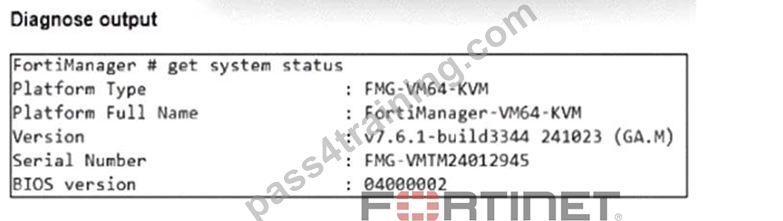
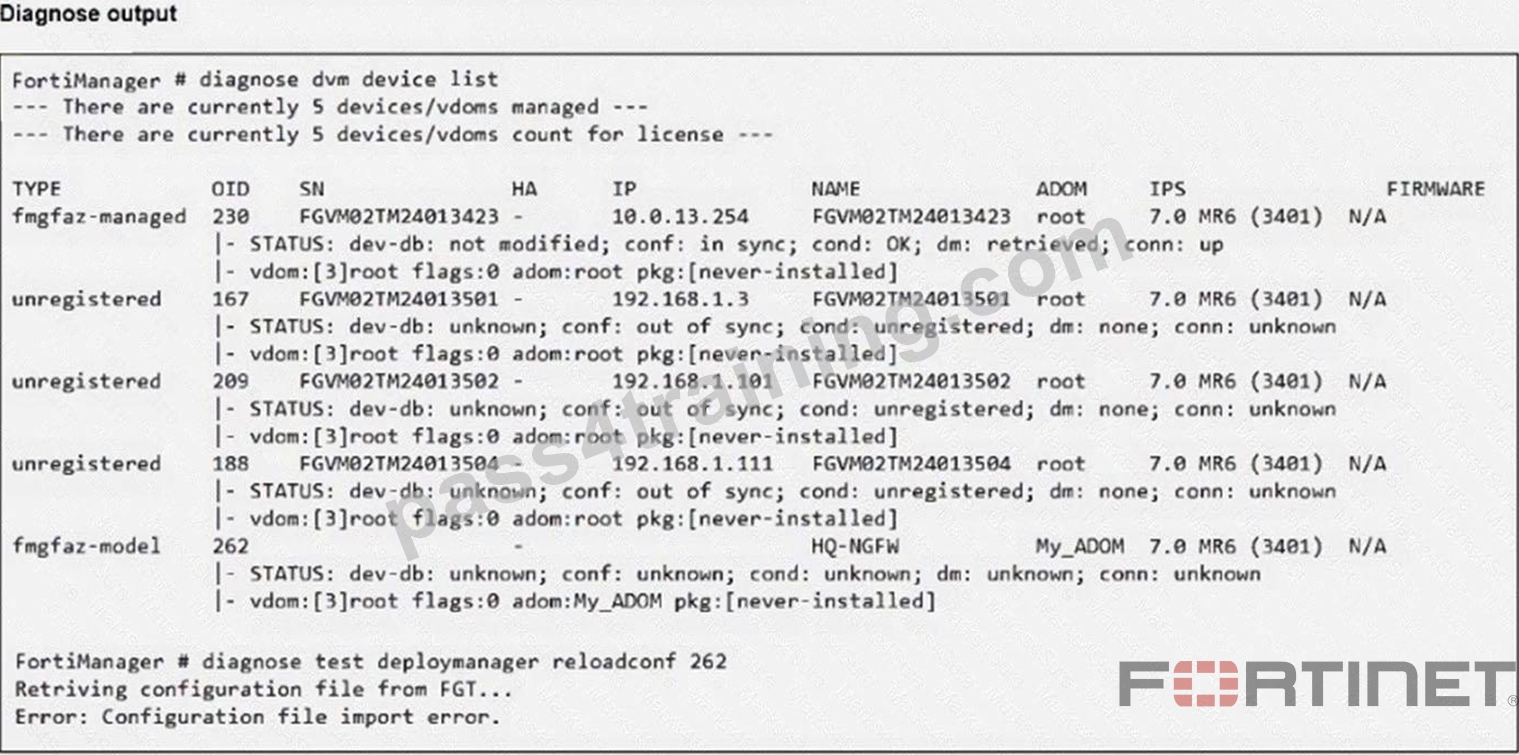
An administrator runs the reload failure commanddiagnose test deploymanager reloadconf 262on FortiManager.
Why does the administrator receive an error message?
- A. The administrator just recently added FortiGate HQ-NGFW as a model device.
- B. FortiManager requires the FortiGate serial number instead of the ID number.
- C. The administrator must use the FortiGate name instead of the ID number.
- D. FortiManager does not support FortiOS version 7.0.
Answer: A
Explanation:
The error occurs because the FortiGate HQ-NGFW device with ID 262 is a newly added model device and has not yet been fully synchronized or installed with a configuration package, which causes the reload configuration command to fail.
NEW QUESTION # 49
......
FCP_FMG_AD-7.6 Exam Crack Test Engine Dumps Training With 47 Questions: https://www.pass4training.com/FCP_FMG_AD-7.6-pass-exam-training.html
Getting FCP_FMG_AD-7.6 Certification Made Easy: https://drive.google.com/open?id=1wHA5rbHNOS8k_K-nKBG67StAH4axyJ27
